Design your ontology and views
Agents help you translate an engineering workflow into types, relationships and view configuration. Give the agent the problem and a concrete example of how people work today.
For a walkthrough from a blank model to initial views and demo data, follow Bootstrap a tool with an agent.
Open the ontology agent
Section titled “Open the ontology agent”- Select the intended organisation and project in the workspace.
- Open Admin, choose Types, then select the Change set tab.
- Choose Open agent, the spinner button, to open the ontology conversation. Enter your brief in Message the agent and choose Send message.
- Review any proposed plan in the conversation. Choose Approve plan to authorize the proposed drafting work, or Reject plan and explain what should change.
- Inspect the draft in Change set when the run finishes and its saved revision appears. Choose Validate, resolve violations and inspect the delta before choosing Accept change set.
Expected result: the accepted definitions appear in Types. Approving an agent plan authorizes its work; accepting the change set publishes the catalogue. These are separate decisions.
Describe the outcome
Section titled “Describe the outcome”For example:
Help us build a requirements and verification tool for our propulsion programme. Each requirement needs an owner and status. Connect it to the subsystem it applies to and the evidence that verifies it. Propose a view for reviewing an individual requirement.
Include representative objects, the questions people ask, and the changes they make. Explain the vocabulary you already use.
Inspect the proposed model
Section titled “Inspect the proposed model”The ontology agent can inspect the catalogue, discuss the model and draft a type change set.
Review the property definitions, relationship endpoints and labels, and any view configuration. Check whether another tool already has an object that this workflow should reuse.
An extra type is useful when it describes a distinct concept. Shared concepts should have shared identities.
Validate and accept
Section titled “Validate and accept”Validate the change set and resolve reported violations. Inspect the differences against the published catalogue.
The in-product ontology agent can prepare and validate the change; it has no publishing operation. You accept its change set in the interface. An external coding agent using the CLI or SDK can publish with your authority, so require explicit approval before it accepts the reviewed revision.
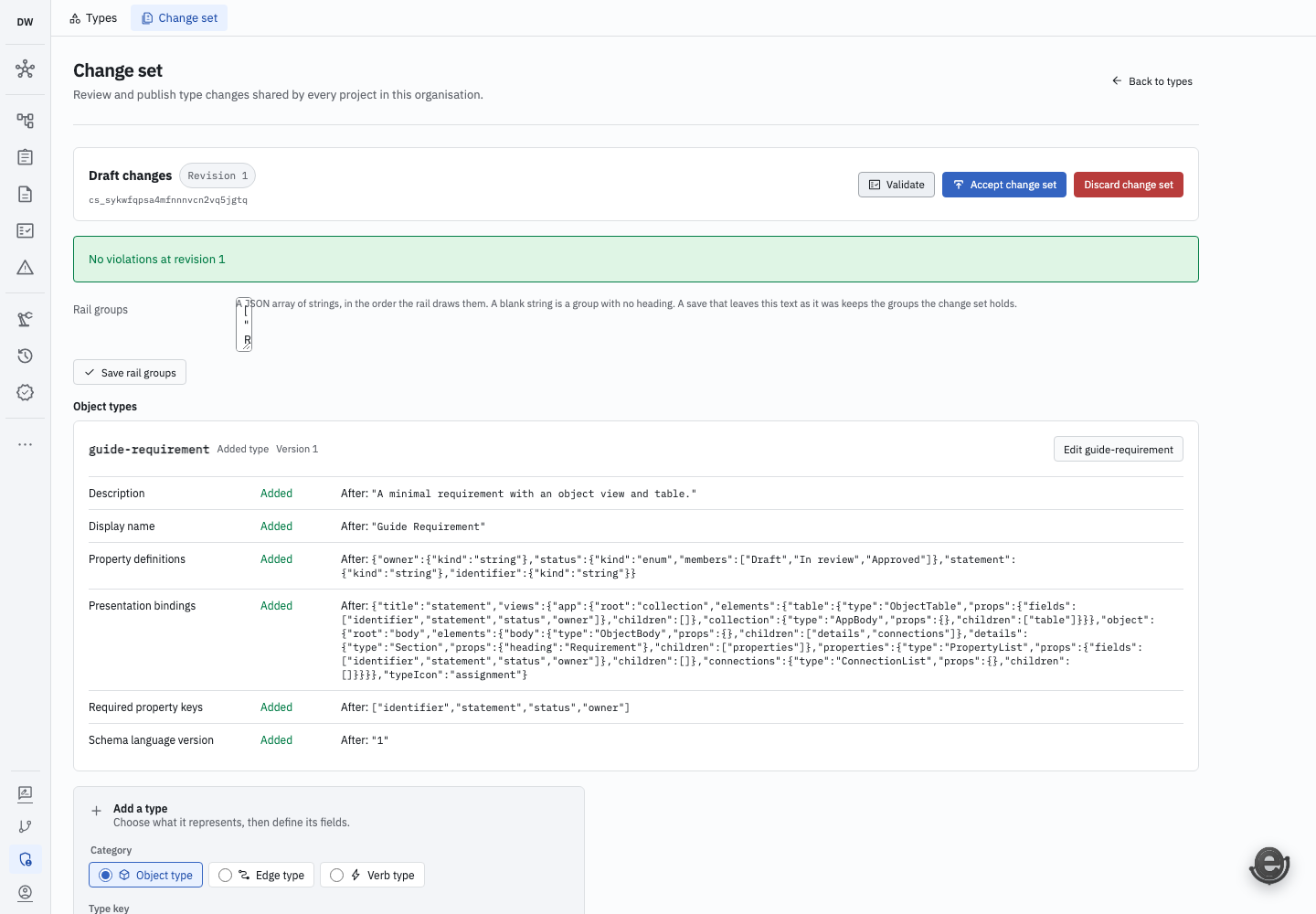
The change set has no validation violations. Accepting it publishes the reviewed type and view definitions; approving an agent plan is a separate action. Open full-size screenshot.
Try the model with real data
Section titled “Try the model with real data”Create a small example and inspect it through the resulting views. Ask someone who performs the workflow to use it.
Iterate on what they need to see and do. Use a coding agent and the CLI and SDK when the workflow needs an integration or additional code.